
How much RAM do I need for Vue 8?

Last edited on: 02 March 2010

This is a question I frequently read on Vue forums, from users about to purchase a new PC. Vue has always been resource hungry and Vue 8 is more so than ever.

To make it short, the answer to this question is: as much as you can get.
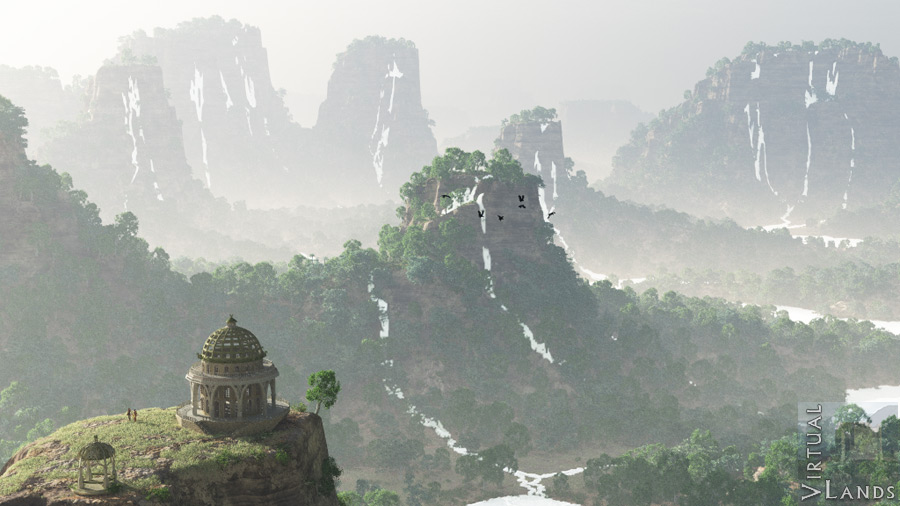
Mad gorgesWhen I started working with Vue 8 (beta), I tested various scenes I had made previousely.
One of them, titled Mad Gorges, made it choke. Vue 8 would crash every time I tried to render it, consuming all the available memory during the dynamic ecosystem population. My computer would then start to swap madly and become unrecoverable.
I have 8 Gb of Ram on my current machine, but in its original version this scene was 65 billion polygons.

Vue 8.4 handles it better and manages to render it fully in preview mode and in screenl size. But it consumes all the available memory(7.4 Gb for Vue alone)  and I get a memory warning at the end.
This means that:

  • the scene would need to be trimmed down to allow  larger renders
  • it would be impossible to run the standalone renderer alongside Vue with this scene
  • swapping makes the render slower as the processors are not working at 100% all the time
Increasing my computer RAM from 8 to 16 Gb would clearly be the solution, but right now it is impossible because my mainboard only takes 8!

The moral of this story: when purchasing a new computer for Vue, give it as much memory it can take, you may always end up with a scene that will need it!
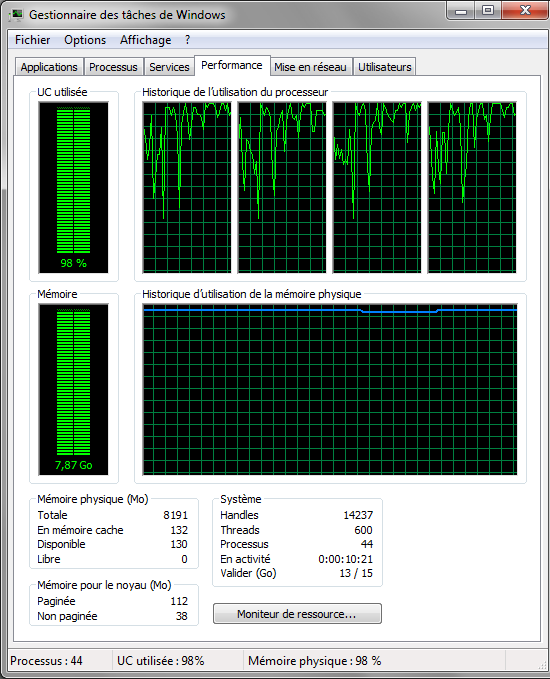
Vue 8 memory use

Comments

Write a comment

  • Required fields are marked with *.

If you have trouble reading the code, click on the code itself to generate a new random code.
 
admin
Posts: 2
Comment
Re:Cores
Reply #5 on : Wed September 15, 2010, 09:49:02
>>Thanks for the info but what about cores? Will 6 cores help with the rendering speeds?

Yes, definitely. An i7 970 would be an excellent investment (if that's what you are thinking of)
Last Edit: September 15, 2010, 09:57:37 by admin  
Star
Posts: 3
Comment
Cores
Reply #4 on : Wed September 15, 2010, 09:34:23
Thanks for the info but what about cores? Will 6 cores help with the rendering speeds?
splinegirl
Posts: 3
Comment
Vue 8 Ram
Reply #3 on : Sun April 25, 2010, 03:13:22
Yeah that's interesting. Personally I'm done with the upgrade mania with the E-on people and will just stick with what I have which is pretty stable on my machine. It's an endless money pit over there, and peple will eventually tire of it.

Thanks for the info. Was going to go to version 8, but you have changed my mind. Nice to get some real info instead of a canned press release.

www.firelight3d.com
admin
Posts: 2
Comment
9 Gb
Reply #2 on : Thu April 01, 2010, 09:47:50
If you have 9 Gb, then you can probably fit 12 (I assume it is 3*3Gb), but of course, you would have to change all your RAM.
I have seen some of the new mainboards for Core 7i (such as the Asus P6T) now have 6 DDR3 slots allowing up to 24 Gb of RAM. This would probably be enough even for Vue 9!
Last Edit: April 01, 2010, 09:50:51 by admin  
Zach
Posts: 3
Comment
Nice website
Reply #1 on : Wed March 31, 2010, 17:35:38
I'm a vue artist just like yourself! i stumbled across your website and i really like it. Great job! I recently bought a new computer for Vue 8 and i thought 9 gb of RAM would be enough... wish i had gotten more :P. Well if you have time... heres my website if you would like to check it out too.

www.podoco.net

Share

Bookstore

Virtual Lands bookstore
Check out the store for books about 3d, fantasy illustrations and landscape painting.


Other links: France photos, Paris photo tours, France Photography Prints, webmaster freelance Web Statistics